A testimonial form people actually finish.
A testimonial form is a short page you send a customer so they can rate you, say what changed in their own words, and add their name and photo.
Ours needs no login and asks one thing at a time. Nothing you collect goes live until you approve it. Try the real flow here.
 By Junaid Khalid · Updated
 testimonials.ltd is a testimonial tool you pay for once. It gives you the collection form, the approval queue and the widgets that put quotes on your site.
What happens between sending the link and showing the quote
- 01You send one linkYour form lives at testimonials.ltd/c/yourbrand. Share it by email, chat or a QR code.
- 02They answer, no accountA star first, then a line of text or a short video recorded in the browser.
- 03It lands as PendingEvery submission waits in your queue, out of public view.
- 04You approve itOne click. Fix a typo first if you need to.
- 05It shows on your wallEvery widget on your site picks it up straight away.
Copy this testimonial form template
These are the fields and questions that get you a quote you can actually use. Paste them into Google Forms, Typeform, Jotform or our form editor. Copying is free and needs no signup.
Standard
The one to start with. About two minutes to fill in.
Short
For busy customers and small asks. Under a minute.
Video first
When a face on camera matters more than a paragraph.
Building it in testimonials.ltd? Name, rating, testimonial, title, company, photo and a social link are built-in fields, and text and video sit on the same form. There is no separate permission checkbox, so put the permission line in your form's intro, where every reviewer reads it before they write.
Longer guides on the blog: client testimonial form for agencies and freelancers; customer testimonial form for products with many customers; testimonial form sample with three filled-in versions.
Testimonial form questions by business type
Swap the middle questions of the template for the set that fits your business. For a longer list tuned to what you sell, use the free testimonial questions generator.
SaaS
Agency and freelance
Courses and coaching
Ecommerce
Local services
What a good answer looks like
This is the shape of answer the standard template is built to pull out. It is written for illustration, with placeholders, so you can see what a usable quote reads like.
For real ones, see testimonial examples broken down line by line.
Build it in the testimonials.ltd form editor
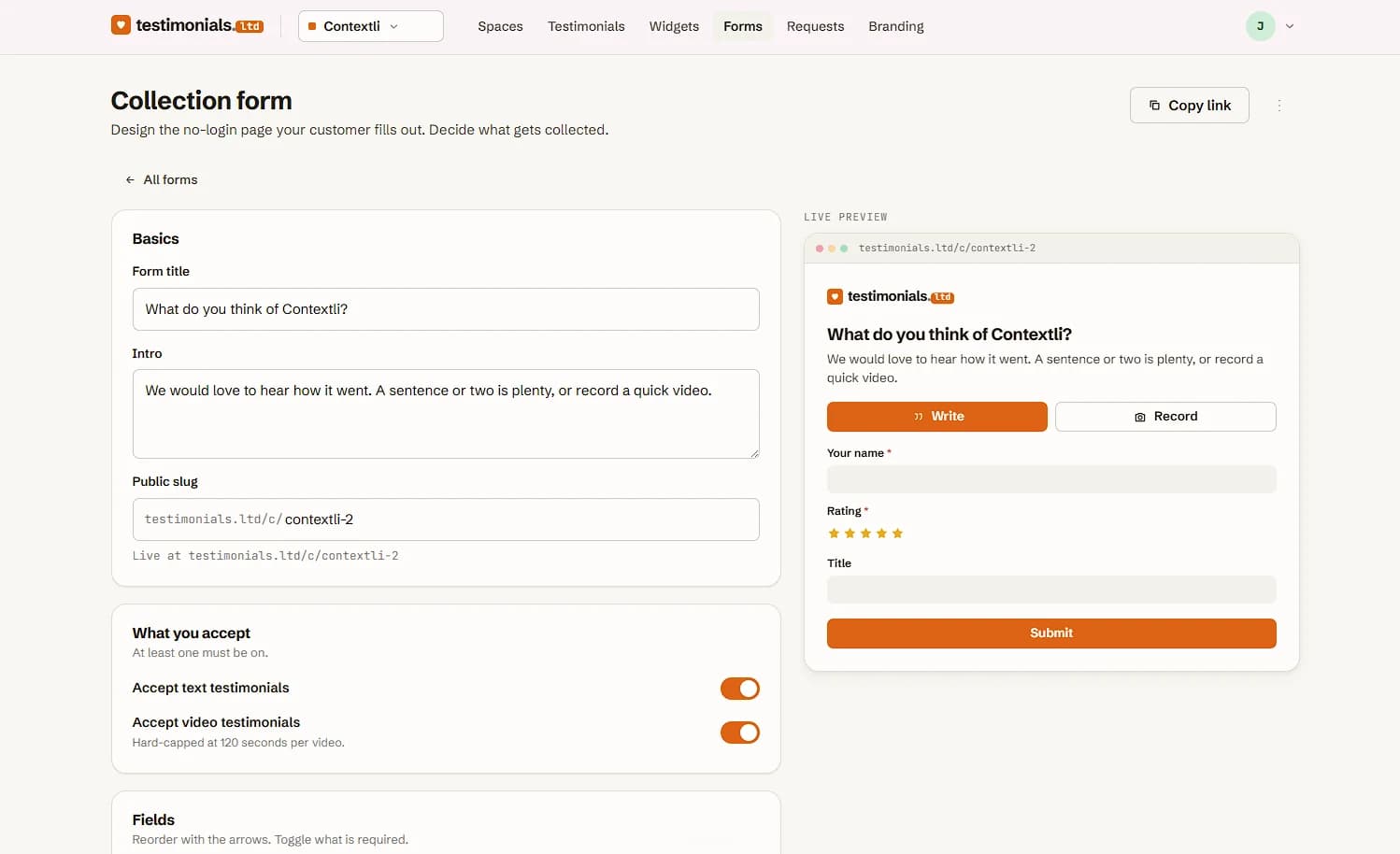
This is the real editor. You set the title and intro, pick your public link, choose text, video or both, and decide which fields are required. The preview on the right is the page your customer sees.
Put the form where your customers already are
Every form gets its own public link, and the share panel sends it four ways.
What happens after someone presses Send testimonial
A form builder stops once the answer arrives. A testimonial form still has work to do.
Google Forms, Typeform or a testimonial tool?
Any form builder can collect the words. The difference shows up after the answer arrives.
What each kind of tool does once a testimonial has been submitted
Source: Google Forms help: file upload questions need a Google sign-in
Watch a customer leave a review with no sign-up
A short film from our channel: the sign-up wall that loses a happy customer, then the same customer recording a testimonial in the browser through a no-login link.
From the testimonials.ltd YouTube channel, 13 October 2026. Watch it on YouTube
How to get a testimonial form finished
A good testimonial form asks five to seven questions and takes under three minutes: a rating, what the customer was dealing with before, what changed, one number or moment, and who they would recommend you to, followed by their details and a permission checkbox.
- Keep it to five to seven questionsCount the rating and the open questions. Name, email, role, company and website are quick fields and sit outside that limit.
- Ask right after a winA delivered project, a first result, a renewal. The request email templates are sorted by those moments.
- Show one thing at a timeA screen full of fields looks like homework, while a single question feels like a small favour.
- Let them talk instead of typeSome people will record forty seconds and never write a paragraph.
- Send the link where they already areA thank-you email, a chat thread, a QR code on a receipt.
What you get the day you set it up
Pay once and keep it. Text testimonials are unlimited on every plan.
Testimonial form FAQ
What is a testimonial form?
A testimonial form is a short page you send to customers so they can leave a review in their own words, usually with a star rating, their name and, if they like, a photo or a short video. A good one asks one thing at a time and needs no account. It also holds each answer for your approval, so nothing goes on your site until you have read it.
Is there a free testimonial form template?
Yes. The testimonials.ltd testimonial form template is free to copy and needs no signup. It comes in three versions: a standard form of about two minutes, a short one for busy customers and a video-first one. Each lists the fields, says which are required and ends with a permission line you can paste into any form tool.
What questions should a testimonial form ask?
Ask what the customer was dealing with before, what changed afterwards, and whether there is a number or moment that shows the difference. Finish with who they would recommend you to. Open questions about change produce quotes you can use. Questions like "How satisfied were you?" usually get a one-word answer.
How many questions should a testimonial form have?
Five or six at most, including the rating. Two or three open questions are usually enough for a strong quote, and name and photo can sit at the end as optional fields. Each extra required field lowers the number of people who finish, so cut anything you would not show on your site.
What should a testimonial say?
A useful testimonial says what the customer was dealing with before, what changed after working with you, and one concrete detail that proves it, such as a number, a deadline met or the moment they noticed the difference. It is written in their own words and signed with their real name. Praise without a before and after reads as generic, which is why a good testimonial form asks for the change instead of a verdict.
How do I ask a customer for a testimonial?
Ask soon after a win, such as a delivered project, a first result or a renewal, and keep the ask short. Send one link to a testimonial request form so the customer can answer in a minute without making an account. testimonials.ltd has more than 100 free request email templates sorted by business type and moment, plus a generator that writes the email for you.
Where can I get testimonials?
From the customers you already have. The best moments are right after a delivered project, a first result, a renewal or a happy support reply. Send a testimonial form link by email, chat or a QR code, and collect Google reviews alongside it with a review link. Every answer you approve can then go on your site as a wall of love or a carousel.
Do customers need an account to fill in a testimonial form?
Customers should not need an account, and on testimonials.ltd they don't. The customer opens your link, taps a star, writes a line or records a short video, adds their name and presses send. On Google Forms, a file upload question makes the respondent sign in to a Google account, which is worth knowing before you ask for photos or videos there.
Can customers record a video testimonial on the form?
Yes, when you turn video on for the form. They can record straight from the browser on a phone or laptop, or upload a clip they already have, and the same form can take text from anyone who would rather type. Text testimonials are unlimited on every plan. Video uses your plan's video slots.
How do I get permission to use a testimonial?
Ask for it inside the form, at the moment the customer writes the quote. The testimonials.ltd template ends with a ready-made permission line covering their words, name, photo and company. On testimonials.ltd, put that line in the form's intro so every reviewer reads it before they start. This is general information, not legal advice.
Can I use Google Forms as a testimonial form?
You can. Google Forms is free and collects the words well. What it does not do is hold answers for approval or put them on your website: replies land in a sheet, and you copy the good ones into your page by hand. A file upload question also needs the customer to sign in to Google.
What happens after someone submits a testimonial form?
On testimonials.ltd it arrives in your queue as Pending. You read it, approve it, and it appears in every widget on your site. If a customer starts writing and leaves without sending, their partial answer is kept in an Almost left a review list, so you can follow up with one short message.
Can I get a testimonial form as a PDF?
Yes. Copy any version of the testimonials.ltd template into a document and save it as a PDF to print. A paper form works at a counter or an event. For everyday use, a link or a QR code is easier, because the answer arrives typed and ready for your approval instead of waiting to be retyped.
The form is half the job. Asking is the other half.
Free, and none of them needs a signup.