How to see my Google reviews
Two different things hide behind this question: the reviews you wrote about other places, and the reviews customers wrote about your business. Here is where each one lives, on a computer, Android and iPhone.
 By Junaid Khalid · Updated
 Quick answer
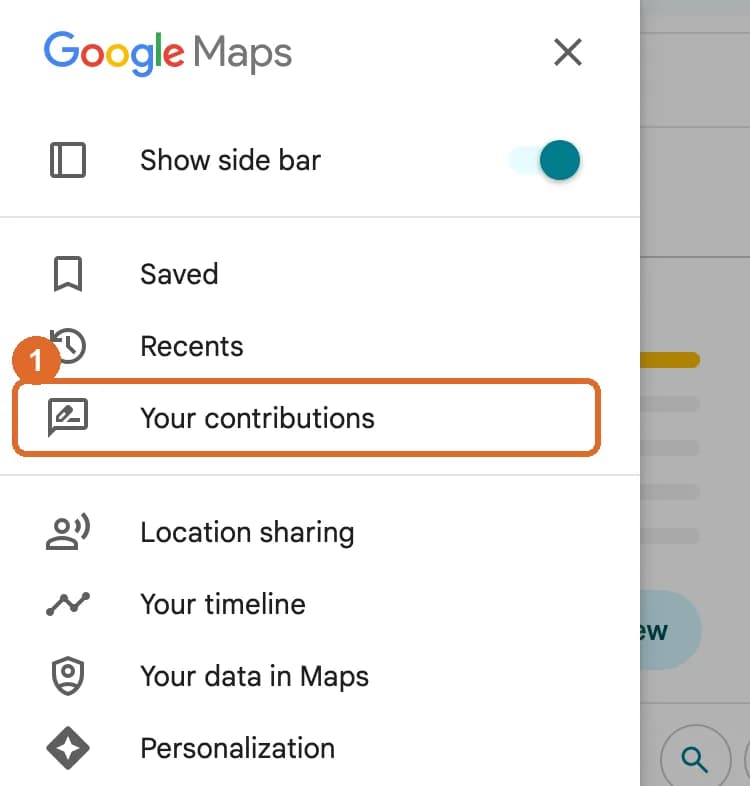
Reviews you wrote: open Google Maps, click Menu, then Your contributions, then Reviews. On a phone, open the Google Maps app and tap Contribute, then View your profile, then See all reviews.
Reviews of your business: search your business name on Google or Google Maps and open the Reviews tab. To reply, sign in to the account that manages your Business Profile and click Read reviews.
How to see the Google reviews you wrote
Every review you post is saved to your Google Maps profile, under the account you were signed in to at the time. The steps differ slightly by device.
Computer
- Open Google Maps in your browser and make sure you are signed in.
- Click Menu (the three lines, top left).
- Click Your contributions.
- Open the Reviews tab. Every review you have written is listed, newest first.
Android
- Open the Google Maps app.
- Tap Contribute at the bottom of the screen.
- Tap View your profile.
- Scroll down and tap See all reviews.
iPhone and iPad
- Open the Google Maps app (not Apple Maps).
- Tap Contribute at the bottom of the screen.
- Tap View your profile.
- Scroll down and tap See all reviews.
How to edit or delete a Google review you wrote
- Open your reviews using the steps above.
- Next to the review, click or tap More (the three dots).
- Choose Edit review to change the stars or text, or Delete review to remove it.
Two things to know. Google shows the date of your latest edit, so an edited review looks new. And a review Google removed for breaking its policies will not come back, even if you appeal to the business.
Who can see your Google reviews?
Everyone. Google says all reviews are public and anyone can find what you add, both on the place you reviewed and on your Maps profile. You can restrict your profile in the Maps app (profile picture, Settings, then Location and privacy), which limits who can browse your profile and follow you. You cannot post a review privately, so delete it if you no longer want it seen.
How to download the reviews you wrote
Go to Google Takeout (takeout.google.com), click Deselect all, tick Maps (your places), and create the export. Google emails you a link to an archive that includes your reviews.
How to see Google reviews for your business
Anyone can read your reviews on Google Maps. Replying, getting alerts and keeping a copy take a little more set-up.
On Google Maps (anyone can do this)
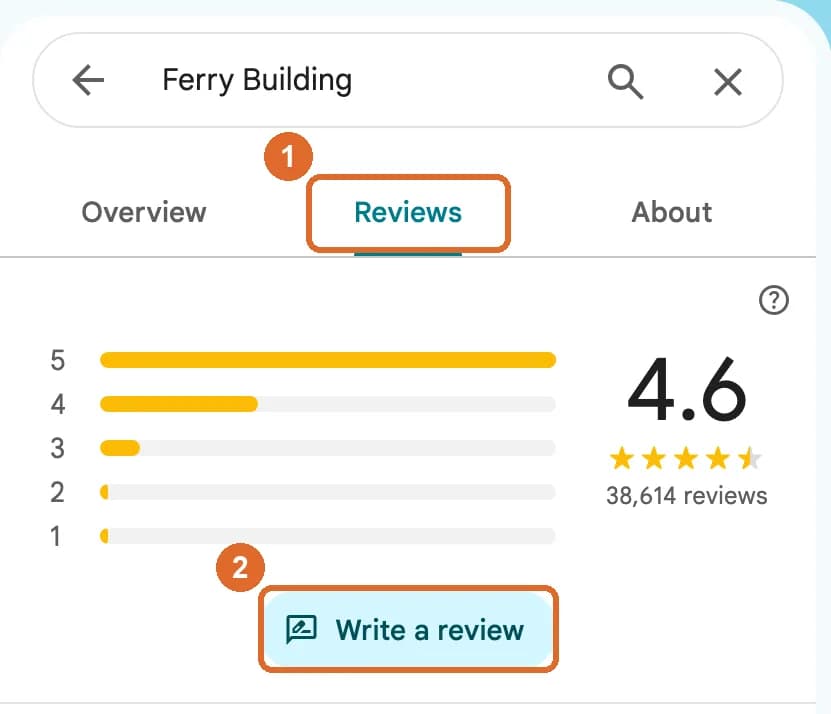
- Search your business name on Google Maps.
- Open your listing and click the Reviews tab.
- Use Sort to see the newest reviews first, or search reviews for a word like a staff name.
In Business Profile (to reply)
- Sign in to the Google account that manages your business.
- Search your business name on Google. Your Business Profile controls appear.
- Click Read reviews, then Reply under any review. You need a verified business to reply.
Google reviews replies before they appear, which usually takes minutes but can take longer.
Get an email for every new review
In your Business Profile, open the three-dot menu, then Notifications, and switch on customer reviews. Google then emails you when a review comes in, so you can reply the same day. Fast replies matter: people read them as a sign the business is listening.
See all your Google reviews in one place, and use them
Google has no export for reviews of your business. testimonials.ltd copies them from your Google Maps link, word for word, next to testimonials from your customers, LinkedIn or anywhere else. Filter by stars and show the best ones on your website.
Bring my Google reviews inWhy can't I see my Google reviews?
Most missing reviews come down to one of six causes. Find your situation, then the fix.
| What you see | Likely cause | What to do |
|---|---|---|
| A review you just wrote is not showing | Google checks new reviews against its policies. Google says this can take a few days. | Wait a few days, then look again under Your contributions. |
| A review that was there has gone | Reviews are usually removed for policy violations such as spam or off-topic content. | Google does not restore reviews removed for policy violations. You can write a new one that follows the rules. |
| Your business reviews vanished after a merge | Two Business Profiles were merged into one. | Google says reviews from both profiles can take a few days to show on Search and Maps. |
| There is no reviews section on your profile | Google temporarily disables reviews for some profiles and categories, and reviews are only available in certain countries and regions. Profiles for schools serving ages 6 to 18 have reviews turned off. | Check your category in Business Profile. If reviews disappeared after a reinstatement, contact Google support. |
| You cannot find your own review | You are signed in to a different Google account from the one you used to write it. | Switch accounts (tap your profile picture) and check Your contributions again. |
| A customer says they cannot post a review | Older phones and old versions of the Maps app can fail to post. | Ask them to update Google Maps, or send them a direct review link instead. |
Sources: Google Maps Help and Google Business Profile Help, checked October 2026.
Make a link that opens your review box
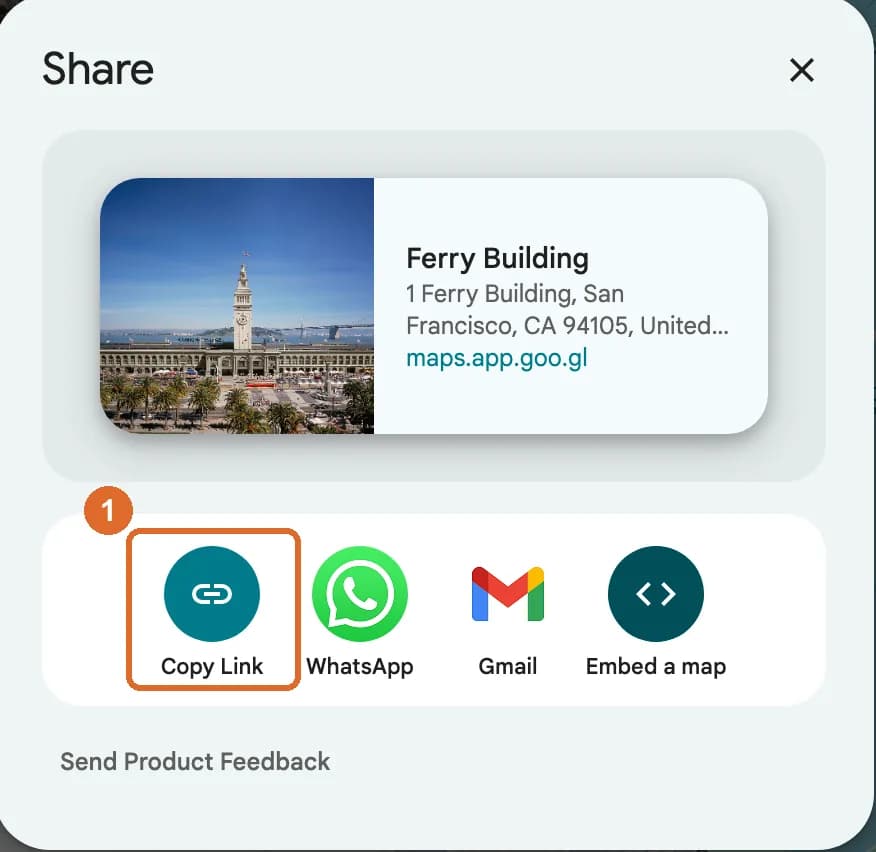
The easiest way to get more Google reviews is to remove the searching. A direct review link (and a QR code on your counter) takes customers straight to the stars.
Show your Google reviews on your own website
Visitors on your site never see your Google rating unless you show it to them. A review widget puts your best reviews next to your buy button, in your colours, with one line of code.

Super tool to manage your LinkedIn posts and much more! Highly recommended.

Very useful tool to keep engaged with intuitive ability to comment and create content.


Legit feels like cloning myself. Trained it once, gave it my VA, and now I barely touch Linkedin!



It has helped me streamlined my LinkedIn posting with high quality writing which actually sounds like me.

80% of the comments it generates are "ready to use" but sometimes the quality feels a bit off. Not sure why. But good overall.

I've used LiGo for 3 months now. It's been very helpful for me and my team. I usually use it word my ideas in a nicer way.


Google reviews FAQ
How do I check my posted reviews on Google?
On a computer, open Google Maps, click Menu, then Your contributions, then Reviews. On Android or iPhone, open the Google Maps app, tap Contribute, then View your profile, then See all reviews. You must be signed in to the Google account you used to write them.
How do I see reviews of my business on Google?
Search your business name on Google or Google Maps and open the Reviews tab, which anyone can do. To reply, sign in to the Google account that manages your Business Profile, find your profile on Google, and click Read reviews. Only verified businesses can reply.
Where did all my Google reviews go?
The common reasons are a policy removal (Google does not restore those), a profile merge (reviews can take a few days to come back), a temporary block on reviews for your category, or being signed in to a different Google account. The troubleshooting table on this page lists the fix for each.
How do I get my Google reviews to show up?
New reviews go through Google's policy checks first, which can take a few days. If yours still does not show, make sure it follows Google's content policy (no links, no offers, no off-topic text) and that you are checking from the same account.
Can other people see my Google reviews?
Yes. Google says all reviews are public and anyone can find what you add. Your reviews show on the place you reviewed and on your Maps profile. Turning on a restricted profile limits who can open your profile, but you cannot post a review privately.
Where do I edit or delete my Google reviews?
Go to Your contributions, then Reviews (computer), or Contribute, View your profile, See all reviews (phone). Next to the review, click More (the three dots), then Edit review or Delete review. Editing changes the date shown on the review.
How do I see my Google reviews on iPhone?
Open the Google Maps app (Apple Maps does not show Google reviews), tap Contribute, then View your profile, then See all reviews.
Can I download a copy of my Google reviews?
For reviews you wrote, use Google Takeout and select Maps (your places). For reviews of your business, Google has no export button, so owners copy them into a tool. testimonials.ltd imports them word for word from your Google Maps link.
Can I see who left a review on my business?
You see the reviewer's public Google name and profile photo, the same as everyone else. Google does not share their email or phone number. You can reply publicly to any review once your business is verified.
Keep going
Your reviews are earned. Put them to work.
Bring your Google reviews into testimonials.ltd, pick the best, and show them where buyers decide: your homepage, pricing page and checkout.
Show my reviews on my site